





How to solve blank/upside down screen on macOS after the update to Big Sur or later
After updating macOS to version 11 (Big Sur) or later, every next attempt to connect by NoMachine results in connecting to a blank desktop or the screen is partially or totally visible but upside down (e.g. the menu bar is visible but displayed in a wrong position).
This behaviour is triggered by the fact that after the system update NoMachine no longer has accessibility permissions, even if they are apparently maintained. For this reason, the user is not prompted to grant permissions.
To solve the problem, restart the NoMachine server.
Note that the session will be terminated, when restarting the server. Otherwise you can grant accessibility permissions manually, as explained at the end of this article.
You can restart the NoMachine server via User Interface:
on the remote mac open the NoMachine UI and access Settings -> Server -> Status
Click on 'Restart the server', administrative credentials are requested to 'Enable changes' at the bottom left.

Otherwise you can restart the server from command line:
| $ sudo /etc/NX/nxserver --restart |
Once restarted, you should be prompted to give permissions to NoMachine:

Click on Open system preferences and add NoMachine to the list:
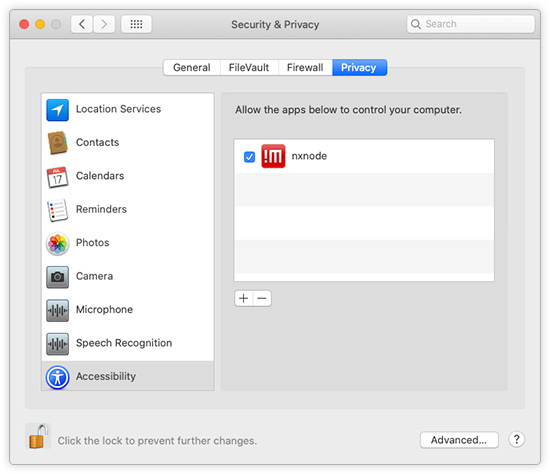
As an alternative to restarting NoMachine, you can grant accessibility permissions manually:
open macOS Settings -> Security & Privacy -> Privacy and add 'nxnode' to the list of applications allowed in the accessibility list. If nxnode is already listed, remove and re-add it.
TROUBLESHOOTING
If the screen blank problem persists, ensure that NoMachine is also allowed for screen recording:
open Settings -> Security & Privacy -> Screen recording and add 'NoMachine' or 'nxnode' to the list.
