





Load balancing Linux virtual desktops across multiple hosts
Are you an organization with hundreds of users, each one needing a personal Linux desktop? Do you need on-the-fly provisioning for extra users as your infrastructure grows?
The Enterprise Terminal Server with additional Enterprise Terminal Server Nodes is the perfect solution for building a scalable multi-node infrastructure and distributing session load amongst these nodes. The remote computers can be physical or virtual machines, either on-premises or hosted in cloud (e.g. Google Cloud, Amazon EWS, Microsoft Azure).
Do you need also to grant high available access to the nodes? Adopt the Enterprise Terminal Server Cluster solution and set-up a failover cluster between two servers.
Who is it for?
Hundreds of remote users who need to work on a personal Linux desktop (a 'NoMachine virtual desktop') or need to use one or more Linux single applications ('custom sessions'). This solution is suitable for any organization with a large user base.
What is it for?
Providing a personal Linux desktop to each user, with the possibility of sharing that desktop with other users. This is called Guest Desktop Sharing, to connect more quickly and easily upon the desktop owner's authorization. Having an account on the remote machine is not needed for the connecting guest.
Accessing and using single applications (console, CAD, IDE) in floating window or whatever you need.
Users can create their own virtual desktop, or run single Linux applications on any of the Enterprise Terminal Server Nodes.
The Enterprise Terminal Server and the Enterprise Terminal Server Cluster products can select the node automatically to load-balance sessions or even let the user manually choose the node. Scale up access by adding new nodes to extend your infrastructure at any moment, without business discontinuity.
Add fault tolerance and grant continuous access to the infrastructure by setting up Enterprise Terminal Server Cluster in a failover cluster pair (high-availability enabled). Enterprise Terminal Server Cluster comes with two licenses already included.
Key features
- - End-to-end data traffic encryption
- - Multiple authentication method supported
- - Guest Desktop Sharing (no account needed) included
- - Personal Linux desktops for each user, session reconnection and interactive/view only screen sharing
- - Single applications, reconnectable
- - Load balancing of sessions among the nodes, multiple algorithms available
- - Failover cluster capabilities with Enterprise Terminal Server Cluster (two licensed servers)
- - Native client for mobile, Windows, macOS and Linux and access via web
What do you need?
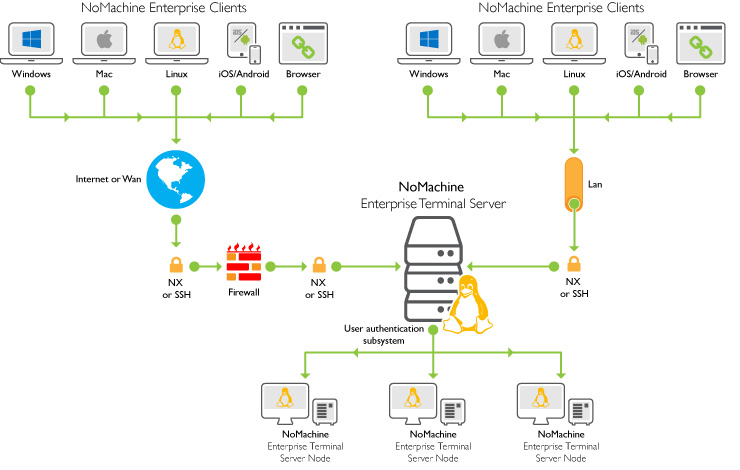
- - 1 x NoMachine Enterprise Terminal Server (or Enterprise Terminal Server Cluster) installed on the remote Linux host (machine A)
- - At least 1 x Enterprise Terminal Server Node installed on another remote Linux host (machine B)
- - NoMachine Enterprise Client installed on your device (it's free to use)
- - Or connect from the browser on your device
A schematic diagram of an Enterprise Terminal Server multi-node setup
TIP
In the case of Linux hosts booted in CLI (command-line-interface) mode, such as for example headless hosts, NoMachine provides a way to access them in UI mode. Pre-requisite is that a desktop environment (e.g. GNOME, Xfce etc …) is installed there.
Licensing
Minimum necessary licenses are:
1 x NoMachine Enterprise Terminal Server
1 x NoMachine Enterprise Terminal Server Node
Sessions will be load-balanced between the Enterprise Terminal server host and the Enterprise Terminal Server Node host.
High Availability requires:
- 1 x NoMachine Enterprise Terminal Server Cluster license for the primary server
- 1 x NoMachine Enterprise Terminal Server Cluster license for the secondary server
- 2 x NoMachine Enterprise Terminal Server Node licenses
You need 2 servers to make a HA cluster.
This is an active-active cluster where the cluster master and slave roles can be switched between the primary and secondary servers. The master is in charge to distribute client connections and the load of session negotiation and management between itself and the slave. This is the load-balancing of the cluster, which is different from the load-balancing of virtual desktops among the Enterprise Terminal Server Nodes! Virtual desktops will be then started automatically on the node chosen by the load-balancing algorithm configured on the ETSC server or by users if the manual selection of the node is enabled.
TIPS
Do you own multiple NoMachine servers even of different kind?
If you own multiple NoMachine Enterprise Terminal Server infrastructures or even other server types like Enterprise Desktop or Workstation, consider providing a single point of access to all of these systems by adopting a NoMachine Cloud Server product.
Combine with the NoMachine Network Service
You can combine your Enterprise Terminal Server with any of the available NoMachine Network subscriptions to get easier access without the need of an external IP and a port opened in the firewall. Just publish the remote computer on NoMachine Network and provide user's credentials to your users subscribed to that service.