





How can I send Ctrl+Alt+Delete to a remote desktop?
The Ctrl+Alt+Del key combination can be forwarded from any NoMachine client to a NoMachine server host once you are connected to the remote desktop.
The steps are:
- connect to your NoMachine remote desktop
- press the Ctrl+Alt+End key combination to send Ctrl+Alt+Del to remote.
If you're connected from Windows, as an alternative to the shortcut:
- open the NoMachine session menu (Ctrl+Alt+0)
- click on the small icon in the right hand corner as illustrated
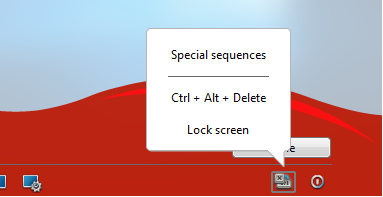
Ctrl+Alt+Delete will now be usable in the remote desktop.
|
|||
|
|||


On mobile app you don’t need to use the menu: open the OnScreen keyboard (or press the toolbar icon if you’ve a physical keyboard) and use the extended bar to press Control, Alt and Delete. It’ll trigger the Secure Attention Sequence on the server to unlock the screen.