





How to use automatic proxy settings with NoMachine
NoMachine is able to automatically detect proxy settings either from the operating system settings or from the network.
To configure any of them:
1) Launch the NoMachine UI and access Settings -> Player -> Security.
2) Select 'Use a proxy for the network connection' and click on Modify.
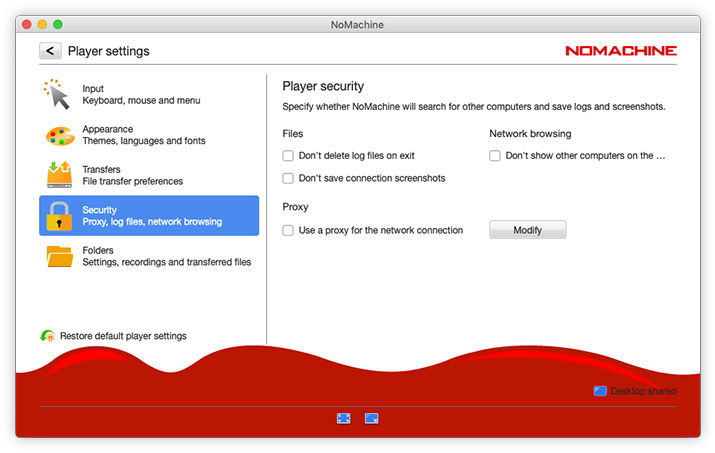
3) In the 'Use a proxy for the network connection' panel:
check option 'Use system proxy settings' to detect proxy settings from the system configuration,
or select instead the 'Automatic proxy configuration' option to detect proxy settings from the network.
If an automatic configuration script is used, select the URL checkbox and provide the appropriate URL to the Proxy Automatic Configuration (PAC) file.
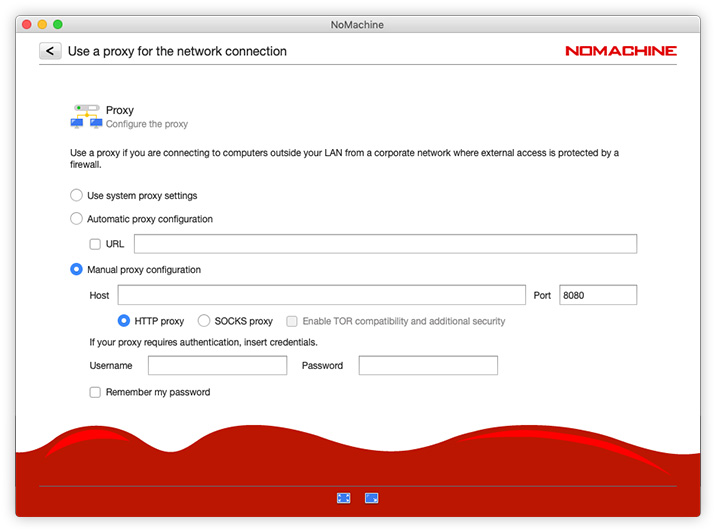
To configure proxy settings manually, please read here: https://www.nomachine.com/AR05S01130