





How to configure proxy settings manually with NoMachine
NoMachine is able to automatically detect proxy settings either from the operating system settings or from the network. Proxy settings can be also configured manually, so that they will apply globally to all connections:
1) Launch the NoMachine UI and access Settings -> Player -> Security.
2) Select 'Use a proxy for the network connection' and click on Modify.
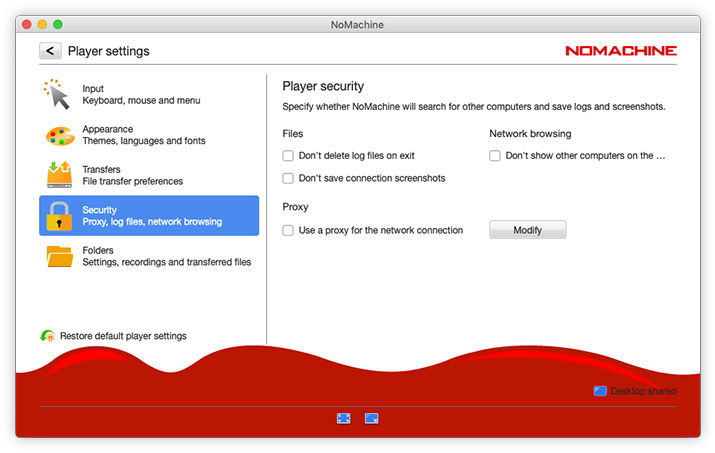
3) In the 'Use a proxy for the network connection' panel check option 'Manual proxy configuration'.
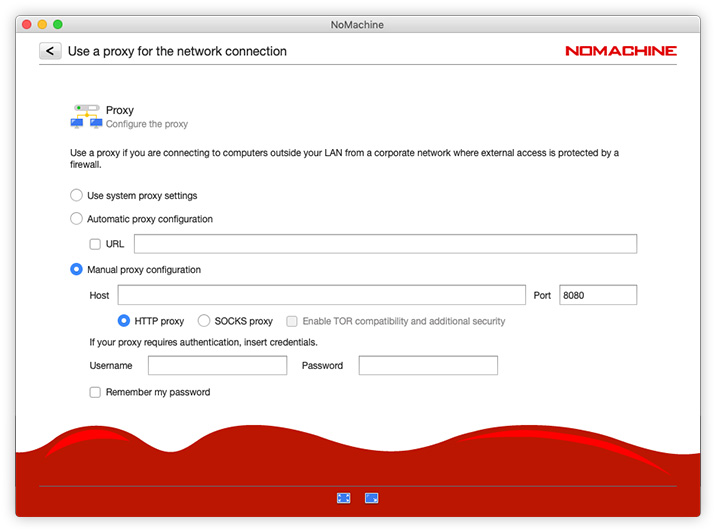
In the Host and Port fields specify respectively the address IP of the proxy and the listen port. HTTP and SOCKS proxy types are both supported. NoMachine is also compatible with a TOR SOCKS Proxy, check 'Enable TOR compatibility and additional security' for that.
If you need to move to different networks, the manual configuration needs to be updated each time. As an alternative, you can use the automatic proxy settings configuration: https://www.nomachine.com/AR05S01129