





Choosing the right NoMachine product
Choose A or B according to your needs:
A - Do you need to access the desktop of your Windows, macOS, Linux, Raspberry or ARM device?
B - Do you need multiple personal workspaces on Linux?

A - Do you need to access desktop, files and programs on your remote Windows, macOS, Linux, Raspberry or ARM device?
Take a look at the NoMachine Enterprise Desktop, perfect also for remote learning/teaching, on-premise remote assistance, distant control, home working, remote collaboration:
| Enterprise Desktop 1 license per-installation no limits to users and connections also in pack of 10 licenses for 10 machines |

Do you have more machines and want a unique entry point for all?
If you have or plan to have 2 or more Enterprise Desktops, you can choose one of the Cloud Server products as a gateway to your remote desktops and get:
- Single point of access to all the Enterprise Desktop nodes
- Central management of the nodes
- Configurable users' access to the nodes, also with automatic assignment
Choose among:
| Small Business Cloud Server up to ten connections  best for small-sized enterprises, organizations, classes... best for small-sized enterprises, organizations, classes... |
Cloud Server up to 20 connections best for small/medium-sized enterprises, organizations, classes... |
Enterprise Cloud Server no limits to connections best for large/extra large-sized enterprises, organizations, classes... |
Are you looking for business continuity?
If you need business continuity through built-in fail-over protection, set-up an active/passive NoMachine cluster to grant continuous access to the nodes:
| Enterprise Cloud Server Cluster 2 licenses for two hosts no limits to connections failover cluster for HA best for large/extra large-sized enterprises, organizations, classes... |


B - Do you need multiple workspaces on Linux?
You can get full access to personal desktops ('NoMachine virtual desktops') and applications, included 3D/2D design, programs for simulation and modeling, lab tools, medical software etc …
Choose between:
| Workstation 1 license per-installation Also in pack of ten licenses for ten machines Up to four personal desktops or single applications best for small-sized enterprises, organizations, classes... |
Small Business Terminal Server 1 license per-installation Up to ten personal desktops or single applications best for small-sized enterprises, organizations, classes... |
Do you plan more than ten personal desktops at once?
If already know to need more than ten NoMachine virtual desktops, adopt the Terminal Server:
| Terminal Server 1 license per-installation No limits to personal desktops and single applications best for small/medium-sized enterprises, organizations, classes... |

Do you need to load-balance sessions among NoMachine hosts?
Go for a multi-node environment with the automatic load-balancing of sessions, if you want to distribute users' load among more machines and look for scalability:
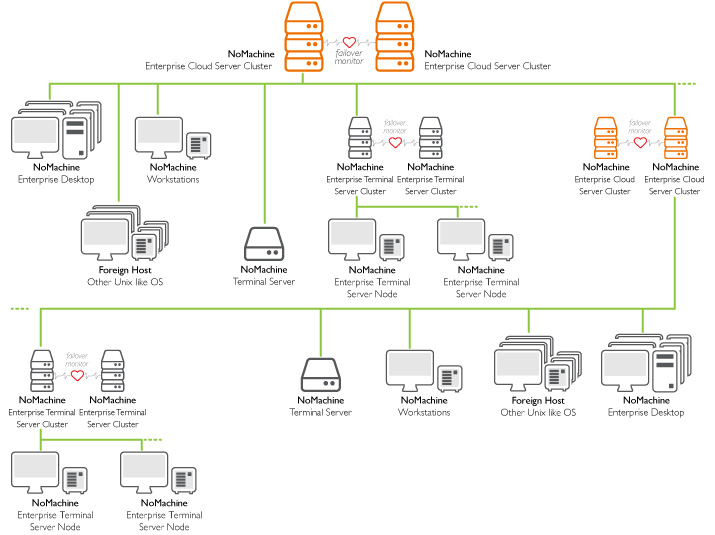
| Enterprise Terminal Server + Enterprise Terminal Server Nodes 1 license for Enterprise Terminal Server 1 license for each node (Enterprise Terminal Server Node) best for large/extra large-sized enterprises, organizations, classes... |

Are you looking for business continuity?
If you are looking for business continuity through built-in failover protection, set-up an active/passive NoMachine cluster to grant continuous access to the Enterprise Terminal Server Nodes:
| Enterprise Terminal Server Cluster + Enterprise Terminal Server Nodes 2 licenses for two Enterprise Terminal Server Cluster installed on two hosts 1 license for each node (Enterprise Terminal Server Node) failover cluster for HA best for large/extra large-sized enterprises, organizations, classes... |
Do you want to access from a unique entry point all your NoMachine servers?
If you have more NoMachine servers and want to access all of them from a single point, take one of the Cloud Server products as a gateway to your desktops and applications and get:
- Single point of access to all the nodes
- Central management of the nodes
- Configurable users' access to the nodes, even with automatic assignment of the node
Choose among:
| Small Business Cloud Server up to ten connections best for small-sized enterprises, organizations, classes... |
Cloud Server up to 20 connections best for small/medium-sized enterprises, organizations, classes... |
Enterprise Cloud Server no limits to connections best for large/extra large-sized enterprises, organizations, classes... |
Do you need also business continuity?
If you need also business continuity through built-in failover protection, set-up an active/passive NoMachine cluster to grant continuous access to the nodes:
| Enterprise Cloud Server Cluster 2 licenses for two hosts no limits to connections failover cluster for HA best for large/extra large-sized enterprises, organizations, classes... |
TIP
We offer a fully featured version for 30 days evaluation of each of our products, do not hesitate to try NoMachine in your environment and use it in your real context!
Packages can be downloaded at: https://www.nomachine.com/download-enterprise