





Prerequisites for a Multinode Environment with Load Balancing of Virtual Desktops (v. 4)
|
This document is intended to provide general guidelines for understanding which NoMachine products and licenses are necessary to set-up a multi-node environment. There are three documents in this series dealing with multi-node and cluster set-ups. - Prerequisites for a Multinode Environment with Load Balancing of Virtual Desktops - Prerequisites for a Multinode Environment with Load Balancing of Virtual Desktops and Failover Cluster - Prerequisites for federating Enterprise Servers and their nodes under one Cloud Server |
||
| A NoMachine multi-node environment is made of a central server that is able to dispatch connections to other node machines. The appropriate NoMachine Product with valid license must be installed on the server host as well as on each of the other node machines. |
Let's distinguish between two environments:
1) multi-node with load-balancing of virtual desktop sessions on (Linux) nodes
2) multi-node with access to the physical desktop on the nodes.
It's possible to mix-up scenario 1) and 2), but for sake of clarity we will treat them separately.
To maintain high availability of sessions and applications, you can add a second server and associate it to the first server to set-up an active/passive cluster. Please read here for more information about multinode environments and failover clusters: https://www.nomachine.com/DT03L00066
Scenario 1)
Minimum requirements to set-up a multi-node environment with load-balancing of virtual Linux desktop sessions
The minimum requirements are:
- 1 NoMachine server host (1 machine called "A").
- 1 NoMachine Node host (1 machine called "B").
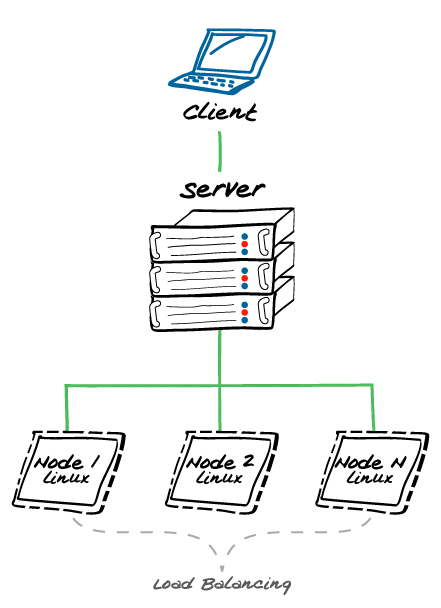
This scenario assumes that virtual desktop sessions will be balanced between the node locale to the server host machine (A) and the unique node host machine (B).
If you don't want to run sessions on the server host, you need 2 NoMachine Nodes so that virtual desktop sessions will be balanced between the 2 nodes. You can add as many NoMachine Nodes as you need.
Diagram below shows a multi-node environment with load-balancing on N Linux nodes. Depending on how the server is configured, it will be possible or not to load-balance virtual desktop sessions on the server host machine:
On the server host you can install:
NoMachine Enterprise Server or NoMachine Cloud Server.
The main difference between them is that additionally to load balancing and failover, the Cloud Server supports web sessions.
On the node host (Linux) you can install one of the following products:
- NoMachine Terminal Server Node
- NoMachine Workstation
The main differences are:
- The Terminal Server Node product supports unlimited concurrent virtual Linux desktop sessions but doesn't allow to start connections directly on its host (the server functionality is not present).
- NoMachine Workstation is a fully operative server installation, i.e. you can connect to the Workstation host directly. Stop the Workstation server to avoid this. It supports 4 concurrent virtual Linux desktops.
Scenario 2)
Minimum requirements to set-up a multi-node environment with access to physical desktops on the nodes
The minimum requirements are:
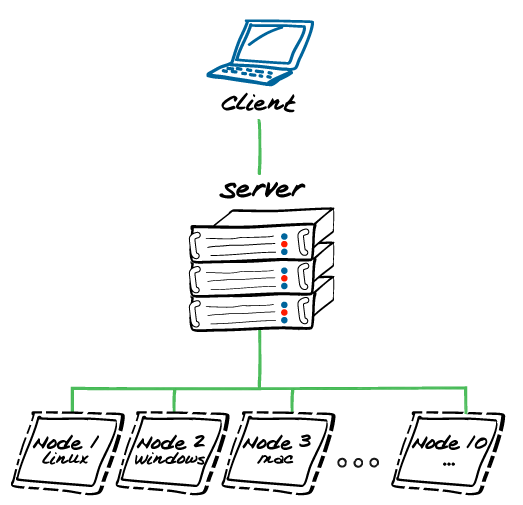
- 1 NoMachine server host (1 machine).
- 10 NoMachine Node host (10 machines).
Diagram below shows a multi-node environment with a central server that gives access to the physical desktop on 10 remote nodes. Nodes can be Linux, Windows or Mac:
On the server host you can install:
NoMachine Enterprise Server or NoMachine Cloud Server.
The main difference between them is that additionally to load balancing and failover, the Cloud Server supports web sessions.
On the node host (Windows, Mac, Linux) you can install:
- NoMachine Enterprise Desktop that is a bundle of 10 licenses valid for 10 physical machines/VMs.